Abiquo adds support for Docker, SoftLayer and CloudSigma, improves templates.
Abiquo launched the latest version of its award-winning software in June 2015. With a new tablet-friendly HTML5 user interface, built-in firewall configuration interface, smoother workflow, deeper integration to Amazon and a raft of new public cloud providers supported, Abiquo customers can meet their tenant’s needs and differentiate their services even further. Adding support for Docker in a true multi-tenant way extends the True Hybrid Cloud to the Docker world. Read below for more information about how Abiquo v3.4 can benefit your business.

Even the most beautiful supermodels need a makeover from time to time, so we’ve kept improving our user interface. Based on the latest HTML5 technology, it’s faster and easier to use, getting your users up and running quickly with built-in tutorials. It’s even easier to manage VM storage now with improved configuration workflow and more templating options.
But it’s not just a pretty face; we’ve streamlined the workflow throughout the interface too. Our standard drag-and-drop method is now supplemented by more use of double-clicking for rapid bulk provisioning, clearer VM template icons and symbols, better navigation and a ruthless attack on the number of clicks needed to perform key tasks.
It’s easy to customise the interface to match your business – every text string can be modified by editing text files.
Abiquo can be fully white-labelled, and can even run multiple brands on the same platform to support reseller scenarios.
Contact us for a demo now!
Service providers are looking to respond and compete with Amazons insatiable growth and dominance in the cloud market. Gartner estimates that Amazon’s cloud revenues are 5x larger than its nearest 14 competitors combined.
Why not look to help those enterprises that are already using Amazon get more control, insight and efficiency out of those services? Help them align usage controls with their existing internal IT policies, manage their public and private cloud resources from one place, simplify the management of multiple accounts and place the right ‘workload’ into the right ‘cloud’.
You can also restrict end users to an approved set of AWS images using the Abiquo appliance library, ensuring consistency and making sure that you control the quality of the images in use.
Since everything in Abiquo is logged, audited and metered through a single platform, you can get a good understanding of what’s happening across your hybrid cloud.

Click to zoom

Click to zoom

Click to zoom
As credible alternatives to AWS emerge in the public cloud space, we have added more public cloud plug-ins to help offer your customers “best of breed” offerings, whether they be at a low price point, the best performance available, or some other unique feature set.
With Abiquo, you can deliver service to your customers from these providers in addition to AWS:
Depending on the capabilities of the cloud provider, you can manage VMs, use configuration management like Chef and Ansible, manage VM images, run boostrap scripts, pass user data into VMs and configure firewalls, all through the same Abiquo interface. Even better, any integrations you build to the Abiquo API will work across ALL these cloud environments, so you don’t need to constantly redevelop in order to use another provider.
Abiquo 3.2 introduced monitoring and metrics of virtual machine on ESX and KVM hypervisors, and in AWS public cloud regions. The feature enables you to obtain a rapid and convenient overview of virtual machine performance through the Abiquo cloud console.
Abiquo supports:
You can change the granularity and calculation type (such as max, min, sum, average) on each metric, and compare the performance of machines in the same Virtual Appliance.
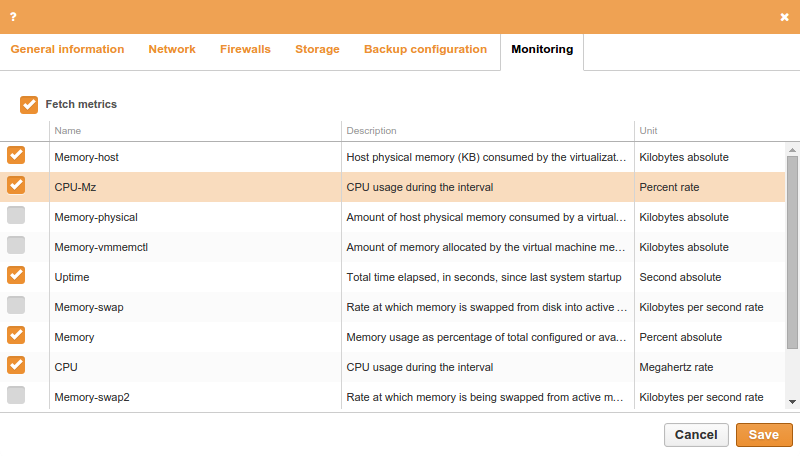
Click to zoom
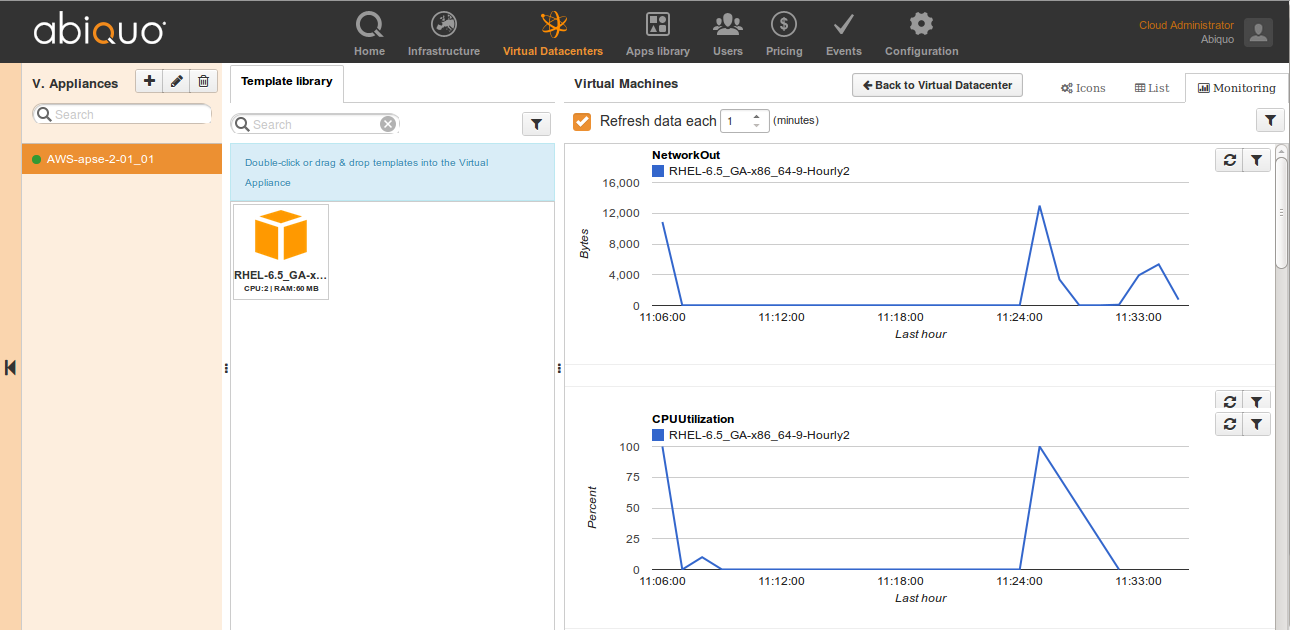
Click to zoom

The Abiquo tutorial system enables you to provide information, focus on a specific Abiquo user interface element, and require the user to perform an action in order to continue. Using tutorials, you can streamline the process of onboarding users with your own platform walkthroughs.The Tutorials feature allows you to create custom tutorials for specific user roles.
One of the best ways to automate the installation of software onto a Linux VM is with a configuration manager such as Chef. Abiquo already has the ability to let your end users select their own Chef recipes, and now we support Chef attributes. Abiquo can pass configuration attributes to Chef for your recipes. You can find out what attributes are available from the Chef recipe configuration files – see the Chef web site for more information.
Click to play

With Abiquo workflow, a user’s requests to deploy, reconfigure and undeploy virtual machines will be held while they are waiting to be reviewed. This can be done by another user with the appropriate privilege, or by an external workflow tool. You could even integrate to another system such as a credit control system which could check to see if a cloud tenant has too many outstanding invoices, and stop deployment if they do!
